Architecture Guide - JavaScript
This guide covers the architectural design of GraphBit's JavaScript bindings, their integration with the Rust core, and patterns for building production applications.
System Architecture
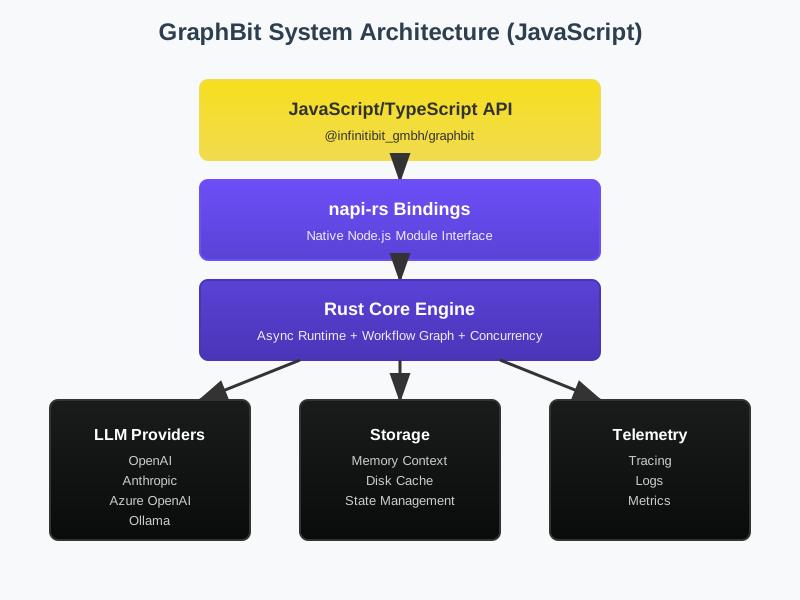
Overview
GraphBit's JavaScript architecture consists of three layers:
┌─────────────────────────────────────────┐
│   JavaScript Application Code           │
│   (Node.js + TypeScript)                │
├─────────────────────────────────────────┤
│   napi-rs Bindings                      │
│   (Type bridges, promise handling)      │
├─────────────────────────────────────────┤
│   Rust Core (graphbit-core)             │
│   (Async executor, workflow engine)     │
├─────────────────────────────────────────┤
│   Native Runtime                        │
│   (jemalloc, tokio, system I/O)        │
└─────────────────────────────────────────┘
Core Components
1. LlmConfig
Purpose: Unified LLM provider configuration
Architecture:
LlmConfig
├── OpenAI
│   ├── API Key
│   ├── Model
│   └── Temperature
├── Anthropic
│   ├── API Key
│   ├── Model
│   └── Max Tokens
├── Ollama (Local)
│   ├── Base URL
│   └── Model
└── Custom (OpenRouter, etc.)
    ├── Base URL
    ├── API Key
    └── Headers
Design Rationale: - Single interface for all providers - Type-safe configuration - Lazy validation (checked on use, not construction) - Serializable to JSON for persistence
2. LlmClient
Purpose: Execute LLM requests with built-in features
Architecture:
LlmClient
├── Configuration
│   └── Retry policy
├── Request Methods
│   ├── complete() - Single request
│   ├── completeBatch() - Multiple requests
│   └── stream() - Streaming response
└── Error Handling
    ├── Network retries
    ├── Rate limit backoff
    └── Timeout management
Design Rationale: - Encapsulates request/response handling - Built-in resilience (retries, timeouts) - Consistent API across all LLM providers - Async/await native with promises
3. Executor
Purpose: Orchestrates workflow execution
Architecture:
Executor
├── Configuration
│   ├── LlmConfig
│   ├── Concurrency limits
│   └── Timeout settings
├── Execution Pipeline
│   ├── Workflow validation
│   ├── Node orchestration
│   ├── Tool execution
│   └── Result collection
└── Performance Tuning
    ├── Thread pool sizing
    ├── Memory management
    └── GC optimization
Design Rationale: - Manages overall execution lifecycle - Controls concurrency and resource usage - Provides observability hooks - Supports low-latency and high-throughput modes
4. Workflow & Node
Purpose: Workflow definition and composition
Architecture:
Workflow
├── Directed Acyclic Graph (DAG)
│   └── petgraph backend (Rust)
├── Node Types
│   ├── Agent nodes (LLM execution)
│   ├── Task nodes (computation)
│   ├── Condition nodes (branching)
│   └── Parallel nodes (concurrent execution)
└── Execution Context
    ├── Variables (state)
    ├── Results (outputs)
    └── History (audit trail)
Design Rationale: - DAG structure prevents infinite loops - Multiple node types support complex workflows - Context threading for state management - Validation before execution prevents runtime errors
5. ToolRegistry
Purpose: Runtime tool management and execution
Architecture:
ToolRegistry
├── Tool Storage
│   └── In-memory registry
├── Tool Interface
│   ├── Name
│   ├── Description (for LLM)
│   ├── Input schema (JSON Schema)
│   └── Handler function
└── Execution
    ├── Schema validation
    ├── Error handling
    └── Result serialization
Design Rationale: - Tools are registered at runtime - Schema-driven validation - LLM-aware descriptions for tool selection - Supports both sync and async handlers
Data Flow Architecture
Workflow Execution Flow

Node Processing Pipeline

Async Model
GraphBit uses async/await throughout for non-blocking operations:
import { init, LlmConfig, LlmClient, Executor, Workflow, Node } from '@infinitibit_gmbh/graphbit';

// All operations are async
async function workflowExample() {
  init();

  const config = LlmConfig.openai({ apiKey: 'sk-...' });
  const client = new LlmClient(config);

  // Client operations return Promises
  const result = await client.complete('Hello');

  // Workflow construction can be sync or async
  const workflow = new Workflow('Example');
  const node = Node.agent('Agent', 'Task', 'agent_1');

  await workflow.addNode(node);
  await workflow.validate();

  // Execution is always async
  const executor = new Executor(config);
  const executionResult = await executor.execute(workflow);
}

// Proper error handling
workflowExample().catch(error => {
  console.error('Error:', error);
  process.exit(1);
});
Data Flow
Request-Response Flow
JavaScript Code
    ↓
napi-rs Binding (type conversion)
    ↓
Rust Core (async executor)
    ↓
LLM Provider (HTTP request)
    ↓
Rust Core (response processing)
    ↓
napi-rs Binding (result serialization)
    ↓
JavaScript Promise (result available)
Workflow Execution Flow
Executor.execute(Workflow)
    ↓
Validate DAG structure
    ↓
Initialize execution context
    ↓
For each node in topological order:
    ├── Resolve dependencies
    ├── Gather inputs from context
    ├── Execute node (LLM, tool, condition, etc.)
    ├── Store results in context
    └── Check for errors/timeouts
    ↓
Return execution result
Memory Management
Zero-Copy Data Transfer
GraphBit minimizes data copying between JavaScript and Rust:
JavaScript String
    ↓
UTF-8 pointer (no copy)
    ↓
Rust processing
    ↓
Result allocated in Rust heap
    ↓
Serialized to JSON (JS-compatible format)
    ↓
Returned to JavaScript
Benefits: - 140× lower memory vs alternatives (per benchmarks) - Reduced garbage collection pressure - Better performance for large payloads
Memory Allocator
- Unix/Linux: Uses
jemallocfor efficient allocation - Windows: System allocator (jemalloc not available)
- Python bindings: Disables jemalloc to avoid TLS conflicts
- JavaScript: jemalloc enabled when available
Concurrency Model
Thread Pool Architecture
Executor (main thread)
├── Worker threads (configurable pool size)
│   ├── LLM client (handles HTTP)
│   ├── Tool execution
│   └── Data processing
└── Event loop (Node.js)
    ├── Promise resolution
    ├── I/O callbacks
    └── GC coordination
Execution Parallelism
// Sequential execution (default)
node1 → node2 → node3

// Parallel execution (explicit)
Parallel(
  agent1,
  agent2,
  agent3
)
Configuration:
const executor = Executor.newLowLatency(config);    // 1 thread
const executor = Executor.newHighThroughput(config); // CPU count
const executor = new Executor(config);              // Default (balanced)
Error Handling Strategy
Error Types
interface ExecutionError {
  type: 'ValidationError' | 'ExecutionError' | 'TimeoutError' | 'ToolError';
  message: string;
  context?: Record<string, any>;
}
Error Recovery
Attempt execution
    ↓
[SUCCESS] → Return result
    ↓
[TIMEOUT] → Check retry policy
    ├── Retryable → Retry with backoff
    └── Non-retryable → Return error
    ↓
[LLM ERROR] → Check circuit breaker
    ├── Open → Return error
    └── Closed → Retry with backoff
    ↓
[TOOL ERROR] → Check tool handler
    ├── Recoverable → Log & continue
    └── Fatal → Stop execution
    ↓
Return final result (success or error)
Type System
TypeScript Integration
GraphBit provides full TypeScript support:
import {
  LlmConfig,
  LlmClient,
  Executor,
  Workflow,
  Node,
  ExecutionResult
} from '@infinitibit_gmbh/graphbit';

interface MyWorkflowResult {
  summary: string;
  nextStep: string;
  confidence: number;
}

async function typedWorkflow(): Promise<MyWorkflowResult> {
  const config = LlmConfig.openai({ apiKey: 'sk-...' });
  const executor = new Executor(config);

  const workflow = new Workflow('TypedExample');
  const node = Node.agent('Agent', 'Process', 'agent_1');

  await workflow.addNode(node);
  await workflow.validate();

  const result = await executor.execute(workflow);

  if (result.isSuccess()) {
    const vars = result.variables();
    // TypeScript knows structure via generics
    return vars as MyWorkflowResult;
  } else {
    throw new Error(result.error());
  }
}
Performance Characteristics
Latency
- Initialization: ~50-100ms (JIT compilation)
- Simple request: 200-500ms (LLM call dominates)
- Workflow execution: Varies (depends on node count and LLM calls)
Memory
- Base overhead: ~20MB (Rust runtime)
- Per executor: +5-10MB
- Per workflow: +1-2MB
- Streaming responses: Constant memory (buffered)
Concurrency
- Thread pool: Auto-sized to CPU count
- Low-latency mode: Single worker thread
- High-throughput mode: All CPU cores
- Max concurrent LLM calls: Configurable (default: 10)
Integration Patterns
Pattern 1: Simple Sequential Workflow
const workflow = new Workflow('Sequential');
const node1 = Node.agent('Step1', 'First', 'step1');
const node2 = Node.agent('Step2', 'Second', 'step2');

await workflow.addNode(node1);
await workflow.addNode(node2);
await workflow.connect('step1', 'step2');
await workflow.validate();

const result = await executor.execute(workflow);
Pattern 2: Parallel Processing
const workflow = new Workflow('Parallel');
const parallel = Node.parallel('ParallelWork', [
  Node.agent('Worker1', 'Task A', 'work1'),
  Node.agent('Worker2', 'Task B', 'work2'),
  Node.agent('Worker3', 'Task C', 'work3')
]);

await workflow.addNode(parallel);
await workflow.validate();

const result = await executor.execute(workflow);
Pattern 3: Conditional Branching
const workflow = new Workflow('Conditional');
const decider = Node.condition('Decide', 'Check condition', 'check');
const yes = Node.agent('YesPath', 'Yes action', 'yes');
const no = Node.agent('NoPath', 'No action', 'no');

await workflow.addNode(decider);
await workflow.addNode(yes);
await workflow.addNode(no);

await workflow.connectCondition('check', 'yes', true);
await workflow.connectCondition('check', 'no', false);
await workflow.validate();

const result = await executor.execute(workflow);
Debugging and Observability
Execution Tracing
const result = await executor.execute(workflow);

if (result.isSuccess()) {
  // Access execution variables
  const vars = result.variables();
  console.log('Execution variables:', vars);
} else {
  console.error('Execution failed:', result.error());
}
Performance Monitoring
const start = Date.now();
const result = await executor.execute(workflow);
const duration = Date.now() - start;

console.log(`Workflow completed in ${duration}ms`);
console.log(`Success: ${result.isSuccess()}`);
Best Practices
-
Always validate workflows before execution
-
Use appropriate executor mode
-
Handle errors explicitly
-
Use appropriate timeouts
-
Monitor resource usage