Python JavaScript
Home
# GraphBit - High Performance Agentic Framework
.png)






Installation
Quick Start
import os
from graphbit import init, LlmClient, LlmConfig

# Initialize GraphBit
init()

# Configure LLM provider
config = LlmConfig.openai(
    os.getenv("OPENAI_API_KEY"),
    "gpt-4o-mini"
)

# Create client and generate completion
client = LlmClient(config)
response = client.complete("What is AI?", 100)
print(response)
Features
- 🤖 Multi-LLM Support - OpenAI, Anthropic, Ollama
- 🔄 Workflow Automation - Build complex agentic workflows
- 🛠️ Tool Integration - Function calling and tool execution
- 📄 Document Processing - PDF, DOCX, text splitting
- 🎯 Type-Safe - Full Type Hints support
- ⚡ High Performance - Native Rust implementation via PyO3
Core APIs
LLM Client
client = LlmClient(config)
client.complete(prompt, max_tokens)
client.complete_batch(prompts, max_tokens, temperature, concurrency)
Workflows
workflow = Workflow("My Workflow")
    .description("Description")
    .build()

executor = Executor(llm_config)
result = executor.execute(workflow)
Embeddings
Document Processing
loader = DocumentLoader()
doc = loader.load_file("./document.pdf", "pdf")

splitter = TextSplitter.recursive(500, 50)
chunks = splitter.split(doc.content)
Tool Calling (with Async Support)
Documentation
Requirements
- Python ≥ 3.10
- Supported platforms: Windows, macOS, Linux (x64, ARM64)
License
Apache License, Version 2.0.
Links
Quick Navigation
🚀 Getting Started
- Installation Guide (Python) - Install GraphBit for Python
- Dependency Installation - Install dependencies for different scenarios
- Quick Start (Python) - Build your first workflow in 5 minutes
- Basic Examples - Simple examples to get you started
📚 User Guide
- Core Concepts - Understand workflows, agents, and nodes
- Workflow Builder - Creating and connecting workflow nodes
- Agent Configuration (Python) - Setting up AI agents with different capabilities
- Document Loader (Python) - Loading and processing documents (PDF, DOCX, TXT, etc.)
- Text Splitters (Python) - Processing large documents with various splitting strategies
- LLM Providers (Python) - Working with OpenAI, Anthropic, Ollama, and more
- Embeddings (Python) - Text embeddings and similarity search
- Data Validation (Python) - Input validation and data quality checks
- Dynamic Graph Generation - Auto-generating workflow structures
- Performance Optimization - Tuning for speed and efficiency
- Monitoring & Observability - Metrics collection and debugging
- Reliability & Fault Tolerance - Circuit breakers, retries, and error handling
🔧 API Reference
- Python API - Complete Python API documentation
- Configuration Options - All configuration parameters
- Node Types - Agent nodes
🔗 Connectors & Integrations
- AWS Boto3 - Amazon Web Services integration
- Azure - Microsoft Azure services integration
- Google Cloud Platform - Google Cloud services integration
- Vector Databases - Pinecone, Qdrant, ChromaDB, and more
🛠️ Development
- Architecture Overview - System design and components
- Contributing Guide - How to contribute to GraphBit
- Python Bindings - Python-Rust integration details
- Debugging - Troubleshooting and debugging workflows
📋 Examples & Use Cases
- Content Generation Pipeline - Multi-agent content creation
- Data Processing Workflow - ETL pipelines with AI agents
- LLM Integration - Working with different language models
- Semantic Search - Building intelligent search systems
- Comprehensive Pipeline - End-to-end workflow examples
What is GraphBit?
GraphBit is a declarative framework for building reliable AI agent workflows with strong type safety, comprehensive error handling, and predictable performance. It features:
- 🔒 Type Safety - Strong typing throughout the execution pipeline
- 🛡️ Reliability - Circuit breakers, retry policies, and error handling
- 🤖 Multi-LLM Support - OpenAI, Anthropic, Ollama
- ⚡ Performance - Rust core with Python bindings for optimal speed
- 📊 Observability - Built-in metrics and execution tracing
- 🔧 Resource Management - Concurrency controls and memory optimization
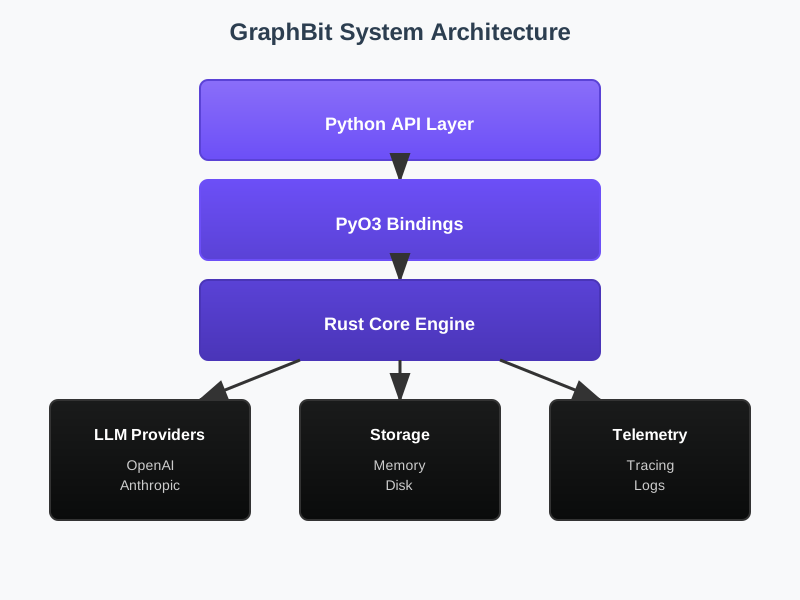
Architecture
GraphBit uses a three-tier architecture:
Community & Support
- GitHub: github.com/InfinitiBit/graphbit
- Issues: Report bugs and request features
- Discussions: Ask Questions and Share ideas
- Contributing: See Our contributing guide
Ready to build your first AI workflow? Start with GraphBit's Quick Start Tutorial!